Adelaide Massive A fan archive of the forums, 2003–2014

Forums › The SMF board (2007–2014) › Technical + Classifieds

The Big Media Centre Thread

Started by Stryke · 17 Dec 2007 · 53 posts survive · see it on the Wayback Machine

AuthorMessage
StrykeSuper Hyper-Mega
Posts: 1,923
Posted: 17 Dec 2007, 8:27amSubject: The Big Media Centre Thread
 
 Hi all, some advice needed.

 Just picked up a cheap Xbox for use as a media centre in the lounge. It isn't chipped.

 Did a quick google search on how to get it up and running and it doesn't seem to look as simple as I was hoping (no suprises there I guess).

 Whats the easiest/cheapest wasy to get this happening?

 cheers!

 
RookiePosts: 820
Posted: 17 Dec 2007, 9:37amSubject: Re: X-Box Crew. Setting up X-Box Media centre???
you need to chip it
image not archived: f_jeevesm_31fabc1.jpg
"Eccentricity is not, as some would believe, a form of madness. It is often a kind of innocent pride, and the man of genius and the aristocrat are frequently regarded as eccentrics because genius and aristocrat are entirely unafraid of and uninfluenced by the opinions and vagaries of the crowd." (Edith Sitwell)
StrykeSuper Hyper-Mega
Posts: 1,923
Posted: 17 Dec 2007, 9:55amSubject: Re: X-Box Crew. Setting up X-Box Media centre???

 Why must you mock me lord.

 Ok.

 Guess I will have to lok into that.
StrykeSuper Hyper-Mega
Posts: 1,923
Posted: 17 Dec 2007, 11:20amSubject: Re: X-Box Crew. Setting up X-Box Media centre???

 Cheers had a look at that thread.

 Seems to be a bit of a pain in the ass but I guess i have no choice.

 
RookiePosts: 820
Posted: 17 Dec 2007, 11:39amSubject: Re: X-Box Crew. Setting up X-Box Media centre???
You need 007 Agent Under Fire, Mech Assault or Splinter Cell. Probably find them on ebay or in Crack Converters relatively cheap.

And someone with an already modded xbox.

http://forums.xbox-scene.com/index.php?showtopic=215055

And Xbox-scene.com is pretty good for all questions about expanding the capabilities of the Xbox in general

Interesting....

But I'd still chip it
image not archived: f_jeevesm_31fabc1.jpg
"Eccentricity is not, as some would believe, a form of madness. It is often a kind of innocent pride, and the man of genius and the aristocrat are frequently regarded as eccentrics because genius and aristocrat are entirely unafraid of and uninfluenced by the opinions and vagaries of the crowd." (Edith Sitwell)
StrykeSuper Hyper-Mega
Posts: 1,923
Posted: 17 Dec 2007, 11:46amSubject: Re: X-Box Crew. Setting up X-Box Media centre???

 Dunno what I will do really. Have to investigate more. I only bought the Xbox cos it was going really cheap, didnt think it would require any further effort.

 BABOW

 
chrisGlobal Moderator
Posts: 3,270
Posted: 17 Dec 2007, 11:49amSubject: Re: X-Box Crew. Setting up X-Box Media centre???
ouch.
confidence is a preference to the habitual voyuer of what is known as...

thinking of buying or selling property? need a conveyancer? pm me if so for details. Smiley
RookiePosts: 820
Posted: 17 Dec 2007, 11:58amSubject: Re: X-Box Crew. Setting up X-Box Media centre???
how much do you want to sell it for?
image not archived: f_jeevesm_31fabc1.jpg
"Eccentricity is not, as some would believe, a form of madness. It is often a kind of innocent pride, and the man of genius and the aristocrat are frequently regarded as eccentrics because genius and aristocrat are entirely unafraid of and uninfluenced by the opinions and vagaries of the crowd." (Edith Sitwell)
StrykeSuper Hyper-Mega
Posts: 1,923
Posted: 17 Dec 2007, 12:05pmSubject: Re: X-Box Crew. Setting up X-Box Media centre???

 I am keen to get the media center thing happening, been wanting to for years.

 Will look into how much more it will cost me first. If it's too much/too hard then I will sell it.

 
bezzPosts: 335
Posted: 17 Dec 2007, 12:41pmSubject: Re: X-Box Crew. Setting up X-Box Media centre???
theres a guy at torrensville that does the xbox and ps2 mods. Its a legit business too, not some dodgy backyard guy.

here's the site:

www.gamefix.com.au

Cost depends on the size of hdd you install
cleascJ.R.F.M.O
Posts: 1,876
Posted: 17 Dec 2007, 12:59pmSubject: Re: X-Box Crew. Setting up X-Box Media centre???
I am keen to get the media center thing happening, been wanting to for years.

 Will look into how much more it will cost me first. If it's too much/too hard then I will sell it.


It'd still prob be cheaper than gettin another computer to do it. So depends on how much you want ya media centre.
Jellious Rebellious
Funky Monkey
Organisation
el_pattoPosts: 145
Posted: 17 Dec 2007, 9:43pmSubject: Re: X-Box Crew. Setting up X-Box Media centre???
I used to have a memory card and Splinter Cell ready to go to do soft modding but lost it a few months ago!  Have done heaps of mates with it over the past few years - took only minutes.   For the cost there is no better media centre.  badthumbs

When you get it modded via chip or softmod I can help you make sure you are running the best software and setting for media streaming, HD tv's etc. 

Check out this guy named Andrew from Xpunked in Prospect.  He is a good dude and knows what he is doing (plus has a steady hand as he is a dentist in training).

http://xpunked.com/XBOX/XBOX.htm

StrykeSuper Hyper-Mega
Posts: 1,923
Posted: 18 Dec 2007, 6:48amSubject: Re: X-Box Crew. Setting up X-Box Media centre???

 Sick, I am prospect as well that looks pretty good!
roostR/evolution massive
Posts: 1,589
Posted: 18 Dec 2007, 7:49amSubject: Re: X-Box Crew. Setting up X-Box Media centre???
ive got splinter cell and an xbox that never gets used, hmmmm
Resonation Wednesday nights on Fresh fm, midnight - 2am.  Announcements and podcasts HERE

AM 2008 tune comp... vote here bitches!!!
el_pattoPosts: 145
Posted: 18 Dec 2007, 4:18pmSubject: Re: X-Box Crew. Setting up X-Box Media centre???
Yep but you need hacked memory card too - you open a hacked save within the game which launches the soft modding software.
orchiePosts: 48
Posted: 18 Dec 2007, 6:55pmSubject: Re: X-Box Crew. Setting up X-Box Media centre???
theres a guy at torrensville that does the xbox and ps2 mods. Its a legit business too, not some dodgy backyard guy.

here's the site:

www.gamefix.com.au

Cost depends on the size of hdd you install

i got my xbox chipped with an 80gb hdd there a few years ago for about $200-250 i think. it was a good price (i thought) at the time but i dont know if you'd pay that much now. have had minor issues with it freezing up, but apart for that its all sweet. considering (if you're keen to play some games as well) that you'll save a dick load of $ on games, i'd say its well worth it.
khemAdministrator
Posts: 5,559
Posted: 18 Dec 2007, 7:33pmSubject: Re: X-Box Crew. Setting up X-Box Media centre???
when i got mine done the chip cost me about $30 and i bought a 120 gig hd myself which got installed with the chip, hd cost me about $120-150

$200+ is a bit steep

laugh
RookiePosts: 820
Posted: 18 Dec 2007, 10:50pmSubject: Re: X-Box Crew. Setting up X-Box Media centre???
just got back from my mates where we watched America's Most Smartest Model (the latest US episode) on his Xbox media centre.

It's worth getting chipped (at the right price) he has it networked with his computer to conveniently transfer downloaded movies.

It also has scripts that enable him to watch streaming ABC vodcasts directly from the Xbox interface.

Sweet!
image not archived: f_jeevesm_31fabc1.jpg
"Eccentricity is not, as some would believe, a form of madness. It is often a kind of innocent pride, and the man of genius and the aristocrat are frequently regarded as eccentrics because genius and aristocrat are entirely unafraid of and uninfluenced by the opinions and vagaries of the crowd." (Edith Sitwell)
orchiePosts: 48
Posted: 19 Dec 2007, 5:25amSubject: Re: X-Box Crew. Setting up X-Box Media centre???
when i got mine done the chip cost me about $30 and i bought a 120 gig hd myself which got installed with the chip, hd cost me about $120-150

$200+ is a bit steep

laugh

tbh i have no idea what i paid for it, it would've been close to 4 years ago. 200 was just a guess
StrykeSuper Hyper-Mega
Posts: 1,923
Posted: 19 Dec 2007, 11:14amSubject: Re: X-Box Crew. Setting up X-Box Media centre???
just got back from my mates where we watched America's Most Smartest Model (the latest US episode) on his Xbox media centre.

It's worth getting chipped (at the right price) he has it networked with his computer to conveniently transfer downloaded movies.

It also has scripts that enable him to watch streaming ABC vodcasts directly from the Xbox interface.

Sweet!

 Yeah thats's what I am talking about!

 Really just gotta work out what size hard drive I want
darkydarkPosts: 32
Posted: 19 Dec 2007, 5:34pmSubject: Re: X-Box Crew. Setting up X-Box Media centre???
Shit these days you can by a modchipped (not soft mod) xbox with up to about an 80gb hd or so for about $150 off valhalla.net.au forums or any number of others on a regular basis.

Other than that, theres still a few people that advertise in the paper and do the chipping for about $50 all up. Much more than that (for just the chip) and you're getting ripped. Certainly dont pay any more than $70.

The HD install bit is easy, any chop can do that. Theres boot disks you can get that practically do all that for you (once the chips installed). The main one is called Slayers and is avaiable on the net in various places.

Darky
Mr.FrostActing Suspiciously
Posts: 100
Posted: 27 Dec 2007, 2:45pmSubject: Re: X-Box Crew. Setting up X-Box Media centre???
Yeah thats's what I am talking about!

 Really just gotta work out what size hard drive I want

If you set it up right Simon, you can a. transfer movies to the Xbox as you need them or b. play the movie across the network on reuest as well.... 80gb HD should do the trick... I mean - for $136 you can get a 500gb HD but I know that in the past some Xbox's had a hard time with those.

I am picking up an XBOX from a mate for $100 and going to get it chipped for sure.... I have a heap of games from my old chipped xbox which died and will chuck it on a tv in the bedroom (when i get it) so we can watch teh coolest downloads
StrykeSuper Hyper-Mega
Posts: 1,923
Posted: 13 Jun 2008, 9:10amSubject: Re: X-Box 360 Media Centre thread

 Anyone know of an alternative to the Windows Media Centre software to use with the 360? I have it all wired up and ready to go from my pc to tv.

 I can't install the version from the X Box site due to being too 733t but am grabbing a .iso torrent to see if that works.
oliJust the
Posts: 1,907
Posted: 13 Jun 2008, 12:51pmSubject: Re: X-Box 360 / Media Centre thread
Anyone know of an alternative to the Windows Media Centre software to use with the 360? I have it all wired up and ready to go from my pc to tv.

If that just uses standard uPnP (I presume it would) to connect then you can use a ton of different software to hook it up.

I use mediatomb running on my Linux server to connect to my PS3.
el_pattoPosts: 145
Posted: 13 Jun 2008, 3:40pmSubject: Re: X-Box 360 / Media Centre thread
How is that PS3 working out for media type stuff Oli?  I borrowed a friends for a weekend before I built a HTPC.  It seemed quite good - nice and silent and easy to use and worked with quite a few codecs.
oliJust the
Posts: 1,907
Posted: 13 Jun 2008, 3:58pmSubject: Re: X-Box 360 / Media Centre thread
How is that PS3 working out for media type stuff Oli?  I borrowed a friends for a weekend before I built a HTPC.  It seemed quite good - nice and silent and easy to use and worked with quite a few codecs.

I haven't really used it all that much to be honest. I've had some problems with files over about 2GB in size though, for example 720p videos which are encoded with the x264 and are from 4 to 8GB in size. icon_cry I need to do some more testing before I could really say how it's working out as an MC.

That said I tried at least half a dozen uPnP servers that run on OSX, Windows, and Linux. Half of them didn't work properly. Mediatomb was way better than all of them.
StrykeSuper Hyper-Mega
Posts: 1,923
Posted: 15 Jun 2008, 7:33pmSubject: Re: X-Box 360 / Media Centre thread

 Seriously what a motherfucking fucking head fuck this has been.

 Props to Oli for helping me, I have the 260 wired to my pc, and they can see each other but I cant get the console to see any files on my pc.

 I am using Windows Media Player 11, which can see my 360 fine but when I try and play files on the 360 it can find anything.

 FFS

 Raar
nathoIt's just like, a minimall.
Posts: 2,149
Posted: 15 Jun 2008, 7:35pmSubject: Re: X-Box 360 / Media Centre thread
I have the 260 wired to my pc,

This could be causing some problems. Have you tried wiring the 360 to the pc?  teef
Civilization is the limitless multiplication of unnecessary necessities.
StrykeSuper Hyper-Mega
Posts: 1,925
Posted: 15 Jun 2008, 7:40pmSubject: Re: X-Box 360 / Media Centre thread
 OMG WOW YOU ARE SOOOOO HELPFUL THAT FIXED IT


 teef
khemAdministrator
Posts: 5,559
Posted: 15 Jun 2008, 7:43pmSubject: Re: X-Box 360 / Media Centre thread
laugh
oliJust the
Posts: 1,907
Posted: 15 Jun 2008, 9:29pmSubject: Re: The Big Media Centre Thread
Have updated thread title to discuss all media centre stuff. What are people using for their MCE's? Xbox or Xbox 360 or PS3s or custom built PCs?

I have a PS3 running but haven't had time to diagnose a whole bunch of little problems with it. I wasted a heap of time with different uPnP servers before stumbling across "mediatomb" which runs very well, but it's still not perfect. TVersity has a good reputation if you're using Windows.
StrykeSuper Hyper-Mega
Posts: 1,925
Posted: 15 Jun 2008, 10:53pmSubject: Re: The Big Media Centre Thread

 I got it working finally!

 What a bitch though, was about 1000 times harder than i thought
Mr.FrostActing Suspiciously
Posts: 100
Posted: 16 Jun 2008, 10:32amSubject: Re: The Big Media Centre Thread
I have a custom built PC with MCE installed which I have had for a couple of years - its PVR ready, but I dont really record to it- Need to upgrade the hard drives for more capacity, but am probably looking at a NAS solution and putting a smaller PC (mini-itx) in its place.

I also want to try mediaportal as the client and stop explorer.exe from loading windows to free up more resources. Its currently wireless whilst I get cabling put through the walls - once thats sorted I will be laughing!

Anyone played with pluto home as a media centre - Cant wait to network my home to play with that beast!
cleascJ.R.F.M.O
Posts: 1,876
Posted: 16 Jun 2008, 1:10pmSubject: Re: X-Box 360 / Media Centre thread
Has anyone had anything to do with these wireless HDD media centres???
Thinking it could be an easier solution over getting an xbox mc up & running.

Mvix 750GB HDMI Wireless Media DivX Hard Drive Player
http://cgi.ebay.com.au/ws/eBayISAPI.dll?ViewItem&item=280234818988&fromMakeTrack=true&ssPageName=VIP:Watchlink:middle:au

Anyone???
Jellious Rebellious
Funky Monkey
Organisation
oliJust the
Posts: 1,907
Posted: 16 Jun 2008, 3:30pmSubject: Re: The Big Media Centre Thread
looking at a NAS solution and putting a smaller PC (mini-itx) in its place.

The problem with most of those mini-itx systems is their CPUs are shit so they can't even handle playing any HD content, for example if you wanted to play x264 720P video they might not handle it. Steer clear of any Via CPUs.

Anyone???

Nope. I prefer custom built setups. Those out of the box solutions really restrict you down the track IMO.
cleascJ.R.F.M.O
Posts: 1,876
Posted: 17 Jun 2008, 6:58amSubject: Re: The Big Media Centre Thread
Been hunting around for reviews and so on and I think I'm going to get one of these soon.

http://cgi.ebay.com.au/Mvix-500GB-DVI-Wireless-Media-DivX-Hard-Drive-Player_W0QQitemZ380035844414QQihZ025QQcategoryZ111503QQssPageNameZWDVWQQrdZ1QQcmdZViewItem

This is prob the most comprehensive review and it was inline with everything else I read about the unit.
Seems the only real issue is streaming large files and trying to play files over 4gig which won't really be an issue for me. Now to get enough cash icon_cry

Quote
After having a 760 for several months, I wanted to share a few of my experiences and frustrations about this unit.

I bought the 760 to stream captured OTA HD files across my home wired network. My objective is to store one copy of an HD file, somewhere on the network, which would be playable in HD on any display. The network is connected through a no frills router. The network configuration is an XP Pro PC connected to 32” LCD via HDMI ; an XP MC PC connected to Panasonic 53” RPTV via HDMI ; the 760 connected to a Toshiba 40” RPTV via component. There are no DVI or HDMI inputs on the Toshiba. Any type of file can be streamed between the PCs problem free. Streaming through the 760 is a different story.

CON:
The 760 will not completely play ANY transport or program stream file larger than 4 gigs. Playback abruptly ends and the file begins to replay from the start. Due to the inherent size of HD transport/program streams, when the 760 is advertised as being able to stream HD .ts and mpeg II files, it is fair to assume a larger sized file limit or no limit at all.
WORKAROUND:
Re-editing the original >4 gig file into multiple files <4 gig. ( part 01, part 02 etc) The brief pause between files reminds me of my laser disc days. Not terrible for episode TV shows but kills the flow of large movie files which may have 3 or 4 parts.
PRO:
The quality of the original source files vary but overall the 760s 1080i output over component is very good.

CON: The 760 cannot consistently stream HD transport streams or HD program streams error free .
Many ABC 720p captures will stream both video and AC3 audio problem free.
FOX 720p captures will stream video ok but the AC3 audio either doesn’t play or plays briefly then stops
The biggest problem is with 1080i sources. All NBC, CBS, CW captures never stream audio and the video playback is a mixed bag.
WORKAROUND:
Install internal HDD and connect 2 external USB HDDs to the 760 and store duplicate copies of the original files and play them from the 760. The 760 will only display two USB drives even if multiple HDDs are connected via a USB powered hub to one of the USB ports on the rear of the 760. By using the USB hub like an old style telephone operator, you can connect external HDDs on the fly by plugging and unplugging USB cables. (Think Lilly Tomlin.)
The original file is checked for errors and saved to one of the three drives connected to the 760. With firmware 1.27, a file can be outputted over the network to the 760s internal HDD. To output a file to either of the USB HDDs, the drive needs to be disconnected from the 760 and connected to a PC. .
PRO:
As stated before, files stored on the 760 internal HDD or connected to the USB ports, play very well and look excellent over component.

The Mvix 760HD I purchased boasted the ability to play HD transport streams over a network. It was the reason I bought the unit. I read many reviews that stated playback over a wired network was good. I have not found this to be the case. I have begun to experiment converting HD streams with AUTO GK to 1.5 gig XVID .avi files of very good quality and retaining the AC3 audio. Results have been encouraging but the conversion process of an average 42 minute 1080i HD transport/program stream to an XVID .avi is between 4—5 hours. 720 p streams take about half that time.

The XVID files stream well. The video is noise free on my relatively small displays, retaining much of the detail of the original. I hear no difference in the audio. Instead of a 500 gig HDD being able to hold 120 4 gig files, it can now hold over 300 1.5 gig files. I find this to be a fair trade-off because I am not limited to where on the network I can store the XVID files.

I want to love the 760 so badly but in the end it is a sad disappointment. If the possibility to correct these issues with a firmware update is feasible, that firmware update should have been released by now. It seems as if releasing firmware 1.27, enabling NDAS, Mvix may be thinking their obligation to this model has ended, and that would be a shame. This box has much potential.

Of course, everything contained in this post is only my opinion from my experiences.

Jellious Rebellious
Funky Monkey
Organisation
oliJust the
Posts: 1,907
Posted: 17 Jun 2008, 9:03pmSubject: Re: The Big Media Centre Thread
Isn't a 4GB limit a bit shit if you want to watch DVD backups or Blu-Ray backups? :/

Also "CON: The 760 cannot consistently stream HD transport streams or HD program streams error free ." seems pretty shit to me...
nathoIt's just like, a minimall.
Posts: 2,149
Posted: 17 Jun 2008, 9:17pmSubject: Re: The Big Media Centre Thread
I'm not really in the market for one of these but IMO if you buy something which needs long and annoying workarounds to view files then it's a waste of money. I still should get off my ass and get my XBOX media centre cranking though.
Civilization is the limitless multiplication of unnecessary necessities.
cleascJ.R.F.M.O
Posts: 1,876
Posted: 17 Jun 2008, 11:31pmSubject: Re: The Big Media Centre Thread
Isn't a 4GB limit a bit shit if you want to watch DVD backups or Blu-Ray backups? :/

Also "CON: The 760 cannot consistently stream HD transport streams or HD program streams error free ." seems pretty shit to me...

I didn't consider Blu-ray, but in regards to my dvd collection, I'd do it properly if I did it at all.

I wouldn't use the streaming option over the network via lan or wifi. Defeats the purpose of having a 500gig hdd in it. My only concern is setting up the wifi by myself... will see how we go, have to get cash first.
Jellious Rebellious
Funky Monkey
Organisation
oliJust the
Posts: 1,907
Posted: 18 Jun 2008, 10:22amSubject: Re: The Big Media Centre Thread
Even still cleasc, if it can't even stream 720i/p content properly then the unit isn't going to have a very long life, and will almost certainly drop in value faster than something that can do these things properly. Just remember to think ahead. Content isn't getting small, resolutions are getting higher! Smiley
el_pattoPosts: 145
Posted: 18 Jun 2008, 11:33pmSubject: Re: The Big Media Centre Thread
Totally agree on the 720p downloads - I couldn't go back now.  Although they still have a place as the standard 350mb 40 minute divx rips are fine provided you aren't watching them on a decent tv or its something you are willing to look past.  I can't see the standard Divx rips going away any time soon.

I ran XBMC on the old Xbox for a few years and it treated me very well.  Definitely a cost effective way to go although it is loud as fuck and a little clunky to use.  Playing the occasional emulated SNES game was cool too.

After playing around with media center software for a while I built a proper HTPC a few months ago which has caused a few headaches but has been awesome.  My current choice of software on it is Vista Media Center as it supports the latest hardware and is actually quite well put together.  I now have complete control over the TV and sound system, watch and record HDTV, play every video, picture and music file under the sun from the one remote and software interface at the highest possible quality.    No flicking between remotes or AV inputs.  That might not sound as awesome as it actually is.  badthumbs
bezzPosts: 335
Posted: 19 Jun 2008, 12:36pmSubject: Re: The Big Media Centre Thread
what sorta system is your htpc? what extras did you need to buy for it over a standard pc? I reckon I'd be pretty keen to build one up in the next few months.
oliJust the
Posts: 1,907
Posted: 19 Jun 2008, 2:01pmSubject: Re: The Big Media Centre Thread
Yes it's a good deal considering hard drives that size (physically and storage capacity) normally cost about $80 right now, and that's without an enclosure...
warped fairyPosts: 1,910
Posted: 19 Jun 2008, 2:04pmSubject: Re: The Big Media Centre Thread
oh goody!  i'd prefer a larger gig one, but money is limited, and i thought that sounded pretty good!  it's only for movies, music & photos anyway!

cheers oli!  just in time for free shipping too!
~the grass might be greener but it's just as hard to mow ~
el_pattoPosts: 145
Posted: 20 Jun 2008, 12:27amSubject: Re: The Big Media Centre Thread
what sorta system is your htpc? what extras did you need to buy for it over a standard pc? I reckon I'd be pretty keen to build one up in the next few months.

I can pm the recipe I went with if you want.  Otherwise it is a pc with all components geared for low (no) noise and low power consumption.  The video card doesn't have to be the latest and greatest but it does have to have the output you want (HDMI etc) and be capable of processing Blu-Ray /264 etc onboard the GPU.  The case should be a HTPC case so it looks more like a piece of home theater equipment crummy old pc.  This website was great for all sorts  www.xpmediacentre.com.au
bezzPosts: 335
Posted: 22 Jun 2008, 7:55pmSubject: Re: The Big Media Centre Thread
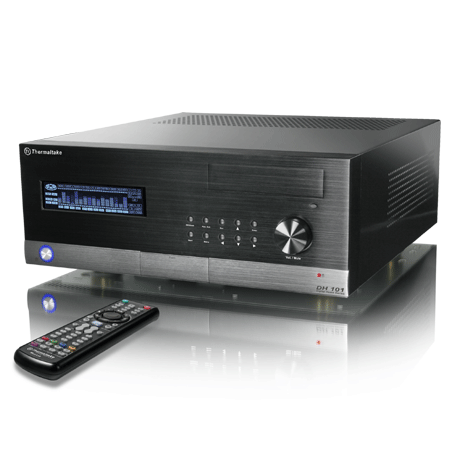
Nice after browsing that site i reckon i'm going to convert my current pc to a media centre. All I need is a tuner card, extra hard drive, blu ray drive and a new case.

Reckon I might splash out and get this flashy case:
oliJust the
Posts: 1,907
Posted: 22 Jun 2008, 8:01pmSubject: Re: The Big Media Centre Thread
Is there a slim version of that? looks nice but it'd be pretty huge.

If you can get a half height tuner card or a USB2 one or something I reckon a slimmer case would be better... Unless you have heaps of room or don't care. Smiley
bezzPosts: 335
Posted: 22 Jun 2008, 8:07pmSubject: Re: The Big Media Centre Thread
problem isnt the tuner card... my video card is bloody huge and the atx motherboard and psu doesnt help. It'll be big but I'll eventually have a tv cabinet to house it in Smiley Unfotunately pretty much all the slim ones are mATX only.