Adelaide Massive A fan archive of the forums, 2003–2014

Forums › The SMF board (2007–2014) › Technical + Classifieds

Need help with "Soundforge!"

Started by Neo · 4 Dec 2007 · 26 posts survive · see it on the Wayback Machine

AuthorMessage
NeoPosts: 52
Posted: 4 Dec 2007, 8:42pmSubject: Need help with "Soundforge!"
All I wanna do is record a mix...

when I put the RCA/headphone jack line from the mixer to the PC/Microphone port
the levels are WAK!

Mixer gains are low...Levels on soundforge are clipping!!
Tried the help files but with no success!!
any help would be grand!
khemAdministrator
Posts: 6,213
Posted: 4 Dec 2007, 8:52pmSubject: Re: Need help with "Soundforge!"
check the line in volume in the audio properties in windows.
NeoPosts: 52
Posted: 5 Dec 2007, 6:38pmSubject: Re: Need help with "Soundforge!"
Cheers for the help guys!

Quote from: Mylo
check the line in volume in the audio properties in windows.

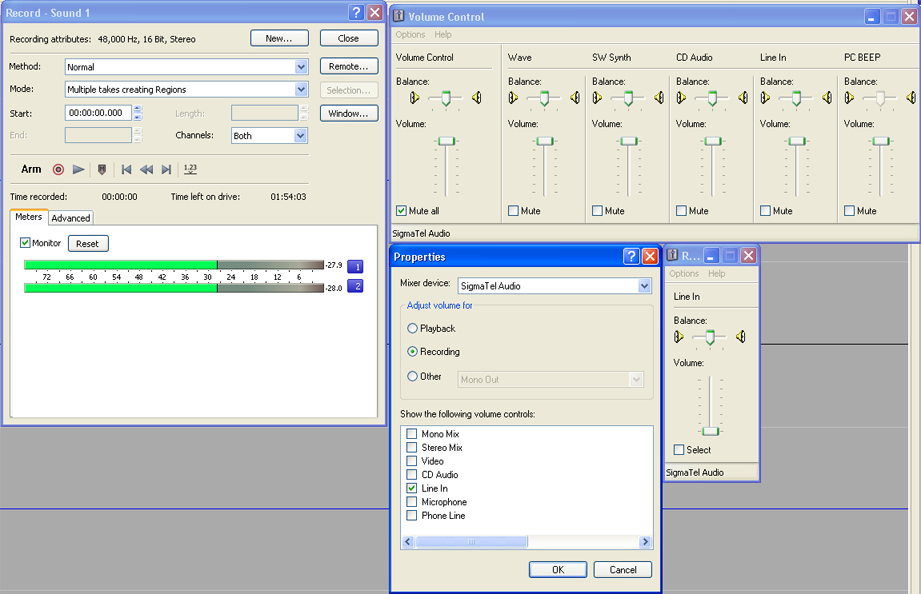
Did that, I put it up and down but to no resolve!

Quote from: Khemical Brother
I think thats your problem - Go for a line-level input.

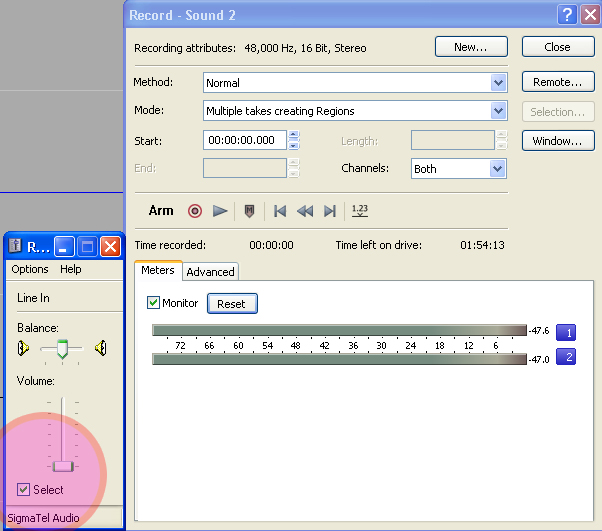
check out my photo, thats the problem...no level on line in yet signal on soundforge is already half way!!
and Im pretty sure I dont have an external microphone - like an old apple i mac!!


khemAdministrator
Posts: 6,213
Posted: 5 Dec 2007, 6:41pmSubject: Re: Need help with "Soundforge!"
the line in on the top right is at full volume. have you tried lowering it?
NeoPosts: 52
Posted: 5 Dec 2007, 6:47pmSubject: Re: Need help with "Soundforge!"
will try now,

but it shouyldnt effect it as its only for playback only, not record

BRB!
LeezeeThe right honourable
Posts: 2,161
Posted: 5 Dec 2007, 6:48pmSubject: Re: Need help with "Soundforge!"
Ah this problem is a doozy. Here's what to try:


Instead of trying to turn your gains down to nothing (making it near impossible to mix) you should plug the main output of your mixer into the computer, rather than the record output. Turn the gains and eq's back to normal and put a record on. then whilst you look at the levels in soundforge, turn the master level on the mixer down until its not clipping (it'll be quite low). Then simply plug the "record out" from the mixer into your amp/monitor and turn up the volume on the amp (rather than the mixer) to the level you wanna listen to.

Hope this helps. not exactly sure if this is ur problem or not, but it is a common one...
I once had this battery with an alkaline problem. I took it to AA meetings.

To all the virgins out there: THANKS FOR NOTHING!

Sleeping bags. They're intense!
NeoPosts: 52
Posted: 5 Dec 2007, 6:56pmSubject: Re: Need help with "Soundforge!"
Actaully I think I may have just fixed it,

all because I hadnt selected a tick box!!! see jpeg, (man arnt I a jack ass)


But yeh if that doesnt work...Lezzes idea could be a goer...cheers guyz!
myloPromoters
Posts: 889
Posted: 5 Dec 2007, 7:41pmSubject: Re: Need help with "Soundforge!"
How did you manage to get Khem and I's quotes jumbled around?  laugh

Your better off using the record-out of your mixer because it is not effected by the master/mix volume,etc. That's what it is designed for.

And yeah under the volume controls, playback volume will have nothing to do with recording volume.

What soundcard do you have btw? Most onboard sound have hardly any headroom.
NeoPosts: 52
Posted: 5 Dec 2007, 8:03pmSubject: Re: Need help with "Soundforge!"
haha all ya do is this

[quote="make some funny name here]The actual quote[/quote] (add this "make some funny name here" to make it happen

U dig?

Yeh my sound card must be shite Im using a Fujitsu laptop Lifebook? not sure of specs,
its a nice lappy but bout 4 years old now...so I dont expect sound card to be ducks nuts

Yeh I will kepp plugging away, i will suss it out! I only wish I had another level on the mixer
so i could adjust volume before laptop input... its a nice mixer but its no DJM 600!
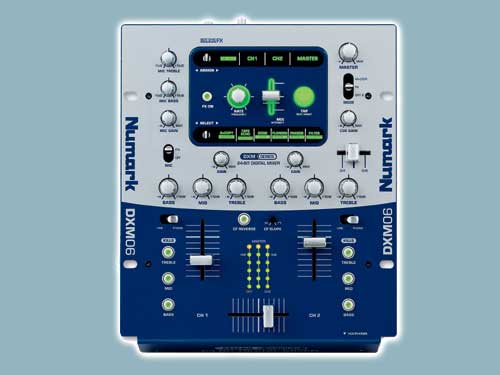
its this


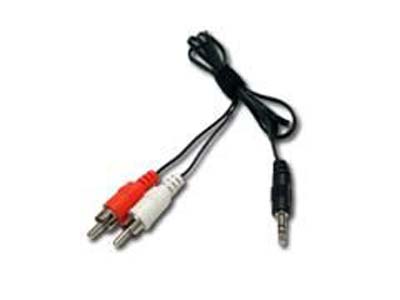
then Im using this to input sound into lappy


Meh, oh well I just keep trying...thanks for all your help though guys!!
NeoPosts: 52
Posted: 5 Dec 2007, 8:46pmSubject: Re: Need help with "Soundforge!"
In the words of Borat

U do not like....WHY?
LeezeeThe right honourable
Posts: 2,161
Posted: 6 Dec 2007, 1:17amSubject: Re: Need help with "Soundforge!"
In the words of Borat

U do not like....WHY?

He's an Allen and Heath nazi. He hates everything and everyone in the world now, because he compares everything to his mixer.  teef
I once had this battery with an alkaline problem. I took it to AA meetings.

To all the virgins out there: THANKS FOR NOTHING!

Sleeping bags. They're intense!
NeoPosts: 52
Posted: 6 Dec 2007, 11:58amSubject: Re: Need help with "Soundforge!"
haha Example

"Well Kevin Rudd sux...Hes no Allen n Heath"

k that was crap!
myloPromoters
Posts: 889
Posted: 6 Dec 2007, 12:39pmSubject: Re: Need help with "Soundforge!"
Leezee knows me too well.

But I'm actually after a Rane at the moment for scratchin
LeezeeThe right honourable
Posts: 2,161
Posted: 6 Dec 2007, 3:31pmSubject: Re: Need help with "Soundforge!"
I'm actually after a Rane at the moment for scratchin

hard to come by at the moment, you know, the drought and everything.
I once had this battery with an alkaline problem. I took it to AA meetings.

To all the virgins out there: THANKS FOR NOTHING!

Sleeping bags. They're intense!
synxPromoters
Posts: 59
Posted: 6 Dec 2007, 5:14pmSubject: Re: Need help with "Soundforge!"
 laugh
I like my car's with defects.. not women with them

SUBstance Present NYMFO(Critical,Renegade,Shougun Ltd,Crunch rec) Friday 14th Nov @ Channel
fictionPromoters
Posts: 1,147
Posted: 9 Jan 2008, 2:41pmSubject: Re: Need help with "Soundforge!"
heres my question

i plug in as shown below

without putting on any music etc sound forge levels are running high and recording a buzz.

now is this due to dodgy soundcard and noise caused from the laptop/pc im using?  standard soundcards are used - no flash hardware here.

its happened on both lappy and desktop
>>>inbound drum & bass
34 wyatt street adelaide ph 8232 8696

FUNKSHOP @ ELH FRIDAY NOVEMBER 2
PATCH FICTION FILTER & GUEST TBC
FREE B4 11 $5 AFTER DOORS OPEN AT 9PM til 3AM
roostR/evolution massive
Posts: 1,795
Posted: 9 Jan 2008, 3:12pmSubject: Re: Need help with "Soundforge!"
its happened on both lappy and desktop

So you'd assume its not the computer or software, as the same thing occurs on both?  Tried a different output on your mixer, or bypassed anything you may mave in between the two (you have a soundcraft compact eh?)
Resonation Wednesday nights on Fresh fm, midnight - 2am.  Announcements and podcasts HERE
fictionPromoters
Posts: 1,147
Posted: 10 Jan 2008, 11:58amSubject: Re: Need help with "Soundforge!"
yeah

ive asked u about this problem before too.

its happening in curts laptop

even though he used to record straight into the mic in ages ago and it worked fine then

now its picking up a large hissing sound.
>>>inbound drum & bass
34 wyatt street adelaide ph 8232 8696

FUNKSHOP @ ELH FRIDAY NOVEMBER 2
PATCH FICTION FILTER & GUEST TBC
FREE B4 11 $5 AFTER DOORS OPEN AT 9PM til 3AM
John LPosts: 447
Posted: 10 Jan 2008, 7:12pmSubject: Re: Need help with "Soundforge!"
You have tried different cables havent you?

If you're getting a buzz or humm on both the desktop and the notebook it sounds like a dodgy earth somewhere causing interference.

I used to have a similar problem when I did a bit of sound stuff on my comp yeeears ago. Changed cables and all was well.

Could also be caused by dodgy power into your house aswell.

Sooo many different possibilitys
Jeremy: Mmm Free Choco!
Super Hans: Yea, And the Secret Ingredient is Crime.
myloPromoters
Posts: 889
Posted: 11 Jan 2008, 2:29pmSubject: Re: Need help with "Soundforge!"
Why are you recording a Line-level source into the Mic input? - That will sound shithouse.

Is there a Line input?
Flukeis Beardface
Posts: 4,527
Posted: 11 Jan 2008, 2:36pmSubject: Re: Need help with "Soundforge!"
sounds like a shot component on the soundcard

would cost bugger all to replace but a fair bit to find
Straight Edge since 1994.
myloPromoters
Posts: 889
Posted: 11 Jan 2008, 3:30pmSubject: Re: Need help with "Soundforge!"
If you have a Line-level source going into a Mic port then that is the first thing to change. The impedance is way different.

Yeah it could be just a faulty cap but on the other hand you are likely to do more damage if using a conventional soldering iron. Personally I'd rather spend less than $100 on a firewire/USB audio interface, rather than using anything built-in. Even one of those Behringer things would do the trick (unless tracking).