
Adelaide Massive A fan archive of the forums, 2003–2014

Forums › The SMF board (2007–2014) › Technical + Classifieds

recording mixes

Started by timboh · 1 May 2009 · 49 posts survive · see it on the Wayback Machine

AuthorMessage
timbohPosts: 4,452
Posted: 1 May 2009, 8:17amSubject: recording mixes
ok i got no idea where to start. what prog to use etc. missus just bought a Toshiba Portege M700 Ultraportable Tablet lappy and im thinking i can finally record some mixes.

i have a pioneer djm-400 mixer that goes into a kenwood krf-v6520, the amp is probably over 10 years old.

any tips and advice will be much appreciated.

edit - mods if there is an old thread i do apologise, i couldn't see one.

dubbdPosts: 1,829
Posted: 1 May 2009, 8:33amSubject: Re: recording mixes
got any audio inputs on the laptop?
Thou shalt not use poetry, art or music to get into girls pants | Use it to get into their heads.
striderThe Infected
Posts: 1,020
Posted: 1 May 2009, 8:35amSubject: Re: recording mixes
Plug your mixer into your mic jack. Using (i think RCA plug) to a 3.5mm jack.

then just search for some freeware recording program... my PC has software with the creative soundcard so ur computer may have something already.
dubbdPosts: 1,829
Posted: 1 May 2009, 8:45amSubject: Re: recording mixes
Plug your mixer into your mic jack. Using (i think RCA plug) to a 3.5mm jack.

then just search for some freeware recording program... my PC has software with the creative soundcard so ur computer may have something already.

cable should have a red and a white rca cable on one end and a headphone jack on the other. google audacity for a free program to record with. make sure it isn't distorting when you record it.
Thou shalt not use poetry, art or music to get into girls pants | Use it to get into their heads.
timbohPosts: 4,452
Posted: 2 May 2009, 10:46amSubject: Re: recording mixes
got any audio inputs on the laptop?

haven't got it yet but it should have quite a few. don't really wanna be putting anything extra on it cos if i fuck it she will peak.

Plug your mixer into your mic jack. Using (i think RCA plug) to a 3.5mm jack.

then just search for some freeware recording program... my PC has software with the creative soundcard so ur computer may have something already.

that sounds pretty fucking easy. will report back how i go in a couple weeks.
RumblePromoters
Posts: 1,717
Posted: 2 May 2009, 12:05pmSubject: Re: recording mixes
Plug your mixer into your mic jack. Using (i think RCA plug) to a 3.5mm jack.

then just search for some freeware recording program... my PC has software with the creative soundcard so ur computer may have something already.

yep easiest way 4 sure you can but the cords anywhere tandy's etc come to think of it inbound may even have a couple if my memory isn't 2 shoddy

i use cool edit 2 mate wicked program can hook ya up a copy if ya like let me know icon_wink
RESONATION 12 till 2 wednesday nights Fresh fm 92.7

Watch this space ya hear fresh Substance's incoming
bettermanon a plain
Posts: 616
Posted: 2 May 2009, 4:01pmSubject: Re: recording mixes
tim google audiacity and download and install (its free and good/easy to use)

then all you need is 1 cable. 2 RCA (red white) on 1 end and 1 stereo mic 3.5mm input on the other end. plug the 2 RCA's into your 'recording' output of the mixer and into the mic input on the laptop. Can get these cables anywhere places like dick smiths tandy etc

ive done it heaps of times if you have any problems lemme know and i can show ya

GlockPosts: 4,815
Posted: 2 May 2009, 6:13pmSubject: Re: recording mixes
Audacity is balls for editing though I reckon. It goes against my freeware/open source policy but I just can't do without Soundforge.
NeoPosts: 935
Posted: 2 May 2009, 6:32pmSubject: Re: recording mixes
yep audacity is good... But if u cant use that
 I use wire tap ~ but thats for MAC...not sure what PC has...

make sure that when ur recording that you watch the levels. Some tracks are louder than others
and it can make ur mixes look amateur...

best o luck man, its sooo stressful recording, u always make 1 mistake
www.melbournednb.com

"Neo's rape of the english language is not an important point."
timbohPosts: 4,452
Posted: 2 May 2009, 6:48pmSubject: Re: recording mixes


make sure that when ur recording that you watch the levels. Some tracks are louder than others
and it can make ur mixes look amateur...


i have a major problem with that whilst mixing. will be grabbing some needles soon so hopefully that may fix it a little bit. i will be all over the levels.

cheers for the tips everyone, will upload a mix when i sort it out.
NeoPosts: 935
Posted: 2 May 2009, 7:59pmSubject: Re: recording mixes
its tough man, unless u have serato scratch whereby u can get a set together and NORMALISE all tunes
(all Mp3s)
makes all tunes the same volume level...Ahhhr serato when will I have you?
www.melbournednb.com

"Neo's rape of the english language is not an important point."
m.r.third-eyesustainablility unit
Posts: 1,106
Posted: 13 May 2009, 2:19amSubject: Re: recording mixes
Approach it like a scientist, some pre-calibration of individual tunes is sometimes vital. Even just listen to each tune end to end and make notes (somewhere, on paper, in your head, both) about the "specifics" of them. It's also useful to build your mix in your mind and "pre-visualise" it's composition. In regards to levels of tunes, use the (headphone) cue mix to compare the one playing, to the one you wanna mix, before you hit the fader. Keep your amp around 50% and keep your mixer's master level output as close to zero dB as you can. ( If it's not loud enough for you to record a mix, turn up the amp, not the mixer's master volume ) When your playing a tune and the mixer's master's running red, it doesn't give you much room for gain control over different leveled tunes. Eq, gain and a good set of headphones are your "friends", and they want to be used by you teef
wave
timbohPosts: 4,452
Posted: 13 May 2009, 7:37amSubject: Re: recording mixes
some handy shit in there, post isn't too long either. cheers mate.
DirtyRohanDnB Whack Job
Posts: 92
Posted: 13 May 2009, 10:09amSubject: Re: recording mixes
also make sure if you're using the "mic input" and not "line in" you turn your mic boost off... soooo many people wonder why their mix sounds distorted because they have a +15dB gain boost on their mic...

 twocents
Scratching on CDJ's is like driving a skyline - you think it's cool, but ultimately you're just a retard.
m.r.third-eyesustainablility unit
Posts: 1,106
Posted: 13 May 2009, 1:31pmSubject: Re: recording mixes
some handy shit in there, post isn't too long either. cheers mate.
hey look. I could easily triple the length of my posts to cover everything. But i would like people to build their own thoughts and processes on top of what's been suggested. My craft as a dj and a producer is something i keep very close to my chest, so to speak. It's ok to spend a good amount of time thinking about the process, before engaging in the practice... I am also not going to give away all my "secrets"... I've done that in the past and some people have just outright abused the knowledge that was passed on to me, and ultimately it affects all of us.
also make sure if you're using the "mic input" and not "line in" you turn your mic boost off... soooo many people wonder why their mix sounds distorted because they have a +15dB gain boost on their mic... twocents
(Edirol) Firewire/USB to RCA/optical FTW, but yes, you are right on the money with that advice selector Arpy.
THRESHOLDPosts: 174
Posted: 18 Aug 2009, 9:23pmSubject: Re: recording mixes
Approach it like a scientist, some pre-calibration of individual tunes is sometimes vital. Even just listen to each tune end to end and make notes (somewhere, on paper, in your head, both) about the "specifics" of them. It's also useful to build your mix in your mind and "pre-visualise" it's composition. In regards to levels of tunes, use the (headphone) cue mix to compare the one playing, to the one you wanna mix, before you hit the fader. Keep your amp around 50% and keep your mixer's master level output as close to zero dB as you can. ( If it's not loud enough for you to record a mix, turn up the amp, not the mixer's master volume ) When your playing a tune and the mixer's master's running red, it doesn't give you much room for gain control over different leveled tunes. Eq, gain and a good set of headphones are your "friends", and they want to be used by you teef
wave

thats what I needed to know thanks man.. so your saying if I put my headphone fader in the middle and it sounds right it will be right when I drop it?
THRESHOLDPosts: 174
Posted: 20 Aug 2009, 12:16amSubject: Re: recording mixes
if i was recording my first set, do you think it would be better to

a) stick to one sub-genre of dnb ie liquid, neuro, tech blah blah blah

b)just smash every track I love and hope it goes well together

GlockPosts: 4,815
Posted: 20 Aug 2009, 12:27amSubject: Re: recording mixes
hope it goes well together

First set? It won't...

Stick to one style definitely. Even people that have been in the game for ages can have trouble with mixing between styles in an enjoyable way, there's very few I can think of that can pull it off!

Put a couple of mixes together, one liquid, one harder etc. and go from there - practice makes perfect. It seems to me you're making way too much of your 'first mix' too, just keep recording and putting them together until you get the results you're looking for and feel happy with sharing it IMO.
THRESHOLDPosts: 174
Posted: 20 Aug 2009, 12:38amSubject: Re: recording mixes
Im not really trying to make to much out of it,

its just I was going to record it and then my new mixer fucked up  Face Palm

plus I live in roxby and only work half of the year = way too much thinking time!

just wanted to know what people think, if you reckon stick with one style is the way, thats good.. I guess because I'd rather be a tiny bit happy with a couple of good mixes in it than thinking the whole thing is awful!!
khemAdministrator
Posts: 9,916
Posted: 20 Aug 2009, 6:39amSubject: Re: recording mixes
sounds like you have loads of time on your hands, so why not do a mix with everything and a mix of just one style... see which one you enjoy most...

you can do whatever you want really, there arent any rules so long as it sounds good and you are having fun!!
makaPosts: 1,234
Posted: 20 Aug 2009, 7:24amSubject: Re: recording mixes
Mate it sounds like you are overthinking things..

Just hit record and mix if it works out good if it doesn't so what, keep practising.

Don't put to much pressure on yourself and just enjoy it.
THRESHOLDPosts: 174
Posted: 20 Aug 2009, 9:12amSubject: Re: recording mixes
well my mixer just got back! teef So im going

thanks for everyones input
NoddyPosts: 7,397
Posted: 20 Aug 2009, 10:18amSubject: Re: recording mixes
I always found when recording mixes that once I got through the first couple of tunes I was fine for the rest of the mix.

Usually I would work out the first two mixes so I knew they would be spot on and the rest would just fall into place after that.
Testing the limits of the human heart since 1973.
THRESHOLDPosts: 174
Posted: 20 Aug 2009, 10:22amSubject: Re: recording mixes
audacity only seems to be recording in mono,

 I've gone to the project then to new stereo track,

but when I record a new mono track comes up....  Face Palm

any ideas??

would this mean that the mic input into my computer is mono??
qzyphusPosts: 609
Posted: 20 Aug 2009, 1:39pmSubject: Re: recording mixes
Keep your amp around 50% and keep your mixer's master level output as close to zero dB as you can. ( If it's not loud enough for you to record a mix, turn up the amp, not the mixer's master volume )
wave

Why would you not just use the record out on the mixer?  Reasonable advice if you don't have one but most mixers without record out at least have a separate volume for a booth or something that you could use, rather than having to compromise the gain structure for what's coming out ya speakers just to get an OK level for recording..?  Am I missing something?

edit - was just reading about your mixer, looks like a tough little unit, and uh...

The FireWire card also lets you simultaneously record your DJ sets to your computer with no additional hardware required. This is perfect for DJs making mix CDs, recording podcasts, and literally dozens of other applications. It’s the next step in the evolution of the DJ mixer, and you can only get it with the d.2.

If you don't have firewire on ya PC you could get a card for about $25.  This should be much better quality than anything you can achieve through your sound card...
someone will see to it that the questions remain questions, getting lost amongst the crowd and the noise...
LeezeeThe right honourable
Posts: 2,899
Posted: 20 Aug 2009, 2:30pmSubject: Re: recording mixes
The record out level of most mixers seems to always be too high for a computer input I've found.

I use the other outputs, like either the master or booth, that way you can adjust it easier.
b@chBring ya Bass Face!
Posts: 719
Posted: 20 Aug 2009, 2:38pmSubject: Re: recording mixes
The record out level of most mixers seems to always be too high for a computer input I've found.

I use the other outputs, like either the master or booth, that way you can adjust it easier.

yep.. if the recording software doesnt allow you to change your input level..  yup
12/09-Fresh FM-Adelaide Show Midday mix

24/09- Playtime pres. DJ FRESH @ Soho

24/10- Eclipse pres. Spring Break @ Shores

30/10- Acetate pres. DJ Randall @ Garage

15/01- Acetate pres. Alix Perez @ Garage
qzyphusPosts: 609
Posted: 20 Aug 2009, 2:45pmSubject: Re: recording mixes
yeah fair point, i do have to turn the input gain down on the macbook down a bit for a good level from the xone's record out, if you didn't check that and just hit record it would sound pretty damn average
someone will see to it that the questions remain questions, getting lost amongst the crowd and the noise...
patchsauce united
Posts: 1,825
Posted: 20 Aug 2009, 2:50pmSubject: Re: recording mixes
remember that you can always make the mix louder once its been recorded but you cant fix it once its been recorded over the clipping point.   

as long as you have a constant level reading somewhere(the mixers master output meter is the best for this, or even a level meter on the recording software) then you should get a nice levelled mix.. this does take practice tho trust me.  and even after that you might wanna chuck a limiter over the whole file to bring the volume up and smooth it out a bit
b@chBring ya Bass Face!
Posts: 719
Posted: 20 Aug 2009, 2:57pmSubject: Re: recording mixes
yeah fair point, i do have to turn the input gain down on the macbook down a bit for a good level from the xone's record out, if you didn't check that and just hit record it would sound pretty damn average

on my Macbook, i use sound studio and have to have the input volume set at around the 1/4 mark! I get good results from the record out at that level on my 92...  Smiley what software do u use?
12/09-Fresh FM-Adelaide Show Midday mix

24/09- Playtime pres. DJ FRESH @ Soho

24/10- Eclipse pres. Spring Break @ Shores

30/10- Acetate pres. DJ Randall @ Garage

15/01- Acetate pres. Alix Perez @ Garage
qzyphusPosts: 609
Posted: 20 Aug 2009, 3:02pmSubject: Re: recording mixes
I use Audio Hijack... I just change the input level in system prefs, and yeah about 1/4 is pretty much spot on there to leave a little bit of headroom on the meter

In Audio Hijack, the level meter shows a lot more headroom, but I don't really trust that...
someone will see to it that the questions remain questions, getting lost amongst the crowd and the noise...
b@chBring ya Bass Face!
Posts: 719
Posted: 20 Aug 2009, 3:09pmSubject: Re: recording mixes
I use Audio Hijack... I just change the input level in system prefs, and yeah about 1/4 is pretty much spot on there to leave a little bit of headroom on the meter

In Audio Hijack, the level meter shows a lot more headroom, but I don't really trust that...


cool, just incase ur interested, Sound Studio allows you to change the input volume on the fly and is convieniently located on the input sound meter which is visible @ all times... I got it for free off teh web too..  Smiley
12/09-Fresh FM-Adelaide Show Midday mix

24/09- Playtime pres. DJ FRESH @ Soho

24/10- Eclipse pres. Spring Break @ Shores

30/10- Acetate pres. DJ Randall @ Garage

15/01- Acetate pres. Alix Perez @ Garage
qzyphusPosts: 609
Posted: 20 Aug 2009, 3:14pmSubject: Re: recording mixes
yeah i used to use sound studio, but it would crash randomly on me heaps and wig out with >2gb audio files... have you had any issues there?

audio hijack mp3s it on the fly and i am lazy

i'm personally of the opinion that if you have to change the recording input level on the fly 'ur doing it wrong'??? should just be set once to give you a decent peak level and no clippage... if there's ever quiet bits i want to emphasise in my mix i'll just use eq or channel gain... and like patch says use teh master out level to check you're not blowing the top... something i haven't thought of?
someone will see to it that the questions remain questions, getting lost amongst the crowd and the noise...
b@chBring ya Bass Face!
Posts: 719
Posted: 20 Aug 2009, 3:21pmSubject: Re: recording mixes
yeah i used to use sound studio, but it would crash randomly on me heaps and wig out with >2gb audio files... have you had any issues there?

audio hijack mp3s it on the fly and i am lazy

i'm personally of the opinion that if you have to change the recording input level on the fly 'ur doing it wrong'??? should just be set once to give you a decent peak level and no clippage... if there's ever quiet bits i want to emphasise in my mix i'll just use eq or channel gain... and like patch says use teh master out level to check you're not blowing the top... something i haven't thought of?

yeah.. its all good advice.. i personally use record out all the time but have seen huge differences between DJ's when recording a whole nights efforts ( sound level wise) and especially the last couple of munts @ the end who run everything in the red...

Ive never had a problem with crashes on sound studio and i usually record 4-6 hours at a time..

12/09-Fresh FM-Adelaide Show Midday mix

24/09- Playtime pres. DJ FRESH @ Soho

24/10- Eclipse pres. Spring Break @ Shores

30/10- Acetate pres. DJ Randall @ Garage

15/01- Acetate pres. Alix Perez @ Garage
qzyphusPosts: 609
Posted: 20 Aug 2009, 3:30pmSubject: Re: recording mixes
with the xone at least (and as it should be), the volume of your mix 1, mix 2, booth etc don't effect the reading on the 'master level' meter.  it's just the sum of the channels.  thus, if you're reading that meter and using record out, then as long as three blues doesn't ever peak the computers input level, you won't have a problem if you never reach reds on the mixers master level, regardless of how much the volume going to the speakers is fucked with...

sorry if that's exactly what you meant but i was just a bit confused and wanted to clarify rotate

edit- ok now i get what you mean, even with the record out you have to get the idiots to watch their level on the mixer Smiley  in that case it may be worth setting your input level with a bit more headroom when there will be other people mixing, then you can chop the recording between each selector and normalise them individually

it was years ago now since i've used sound studio, so might have gotten a lot better yup
someone will see to it that the questions remain questions, getting lost amongst the crowd and the noise...
THRESHOLDPosts: 174
Posted: 20 Aug 2009, 5:10pmSubject: Re: recording mixes


If you don't have firewire on ya PC you could get a card for about $25.  This should be much better quality than anything you can achieve through your sound card...


I followed all previous advice on the thread, kept the output below 0db, its only recording mono, or is that normal for audacity?

oh ok, but I wouldnt just be able to put it on a laptop would I. ie I would have to put it into a tower PC etc... Im just not that computer litterate...

and the D2 has been a unit since I got it back in working order teef
qzyphusPosts: 609
Posted: 20 Aug 2009, 5:32pmSubject: Re: recording mixes
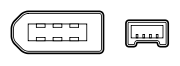
hard to say on the mono thing... sure ur laptop doesn't have firewire? many laptops have a smaller 4 pin connection


                          ^^^ liek so
someone will see to it that the questions remain questions, getting lost amongst the crowd and the noise...
THRESHOLDPosts: 174
Posted: 20 Aug 2009, 6:01pmSubject: Re: recording mixes
yeah it sure dont icon_cry

oh well, just have to get a macbook or a desktop
GlockPosts: 4,816
Posted: 20 Aug 2009, 6:19pmSubject: Re: recording mixes
its only recording mono

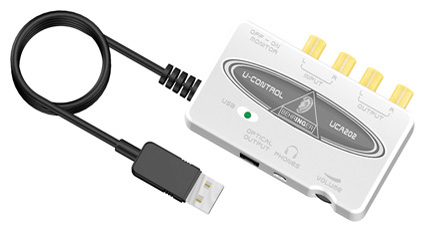
Behringer do a cheap USB audio interface for about 50 bucks that I have used to record to my laptop before. If you want something that does the job with minimal bells and whistles go for one of them or something similar on the market. It solved my issues with laptop line in (which being a mic input is mono). I totally missed that mono issue before when reading this thread lol.

Behringer UCA202

GlockPosts: 4,816
Posted: 20 Aug 2009, 7:06pmSubject: Re: recording mixes

You can't really fuck anything up mate, there's examples on the web/box if you need them but it's pretty much plug everything in from A-Z; USB in the PC and L/R RCA's from your mixer into the appropriate inputs of the interface.

Then set Audacity's recording input to the interface as opposed to Realtek audio or Windows audio or whatever it normally is. I've found it overrides all the default audio settings in Windows when plugged in anyway so it will most likely do that for you automatically but check anyway.
THRESHOLDPosts: 174
Posted: 20 Aug 2009, 10:40pmSubject: Re: recording mixes
sweet, will get one
GlockPosts: 4,816
Posted: 23 Aug 2009, 7:02pmSubject: Re: recording mixes
sweet, will get one

Make no bones about it mate, it's plastic fantastic, feel and looks tinny as, the metal looking nameplate on mine (actually a sticker) is peeling off but it does the job and doesn't cost a million bucks.

Pretty much like most Behringer shit really, but you don't want to get into the habit of buying their stuff if you don't need to (ie can afford quality) lol.

Having said that I thrashed a DXM700 (Pioneer clone) mixer for years, whilst it had it's issues (stuffed faders - 'fixed' backyarder style though) it did the job well enough!
THRESHOLDPosts: 174
Posted: 24 Aug 2009, 7:10amSubject: Re: recording mixes
Behringer shit really, but you don't want to get into the habit of buying their stuff if you don't need to (ie can afford quality) lol.


yeah Im hearing ya, but the sound quality is still going to be good?? And if its not, is there any others of these you;d recommend? just something basic that you plug into your PC...

nathoPromoters
Posts: 3,546
Posted: 24 Aug 2009, 7:13amSubject: Re: recording mixes
I'd say the sound quality would be good enough. You shouldn't really notice a massive difference if it's just line-in recording. Other than that though there are heaps of interfaces out there, but if you want a 'good' one you're really going to be paying 250+
GlockPosts: 4,816
Posted: 24 Aug 2009, 10:50pmSubject: Re: recording mixes
sounds like the behringer it is...

all i want to do is plug in my mixer via rca's

dont need to play any instruments or anything like that Smiley

cept my decks  teef

Sound quality is fine mate. Gold plated terminals and all that jazz. Unless you're some Rainman audiophile I think you'll have no dramas, I certainly can't tell the difference...